

App

Gantt Chart Pro: Project Timeline & Task Management for Microsoft Teams

Gantt Chart Pro brings powerful, visual project planning into your Teams workspace. Create timelines, assign tasks, track progress, and collaborate. All in one place.
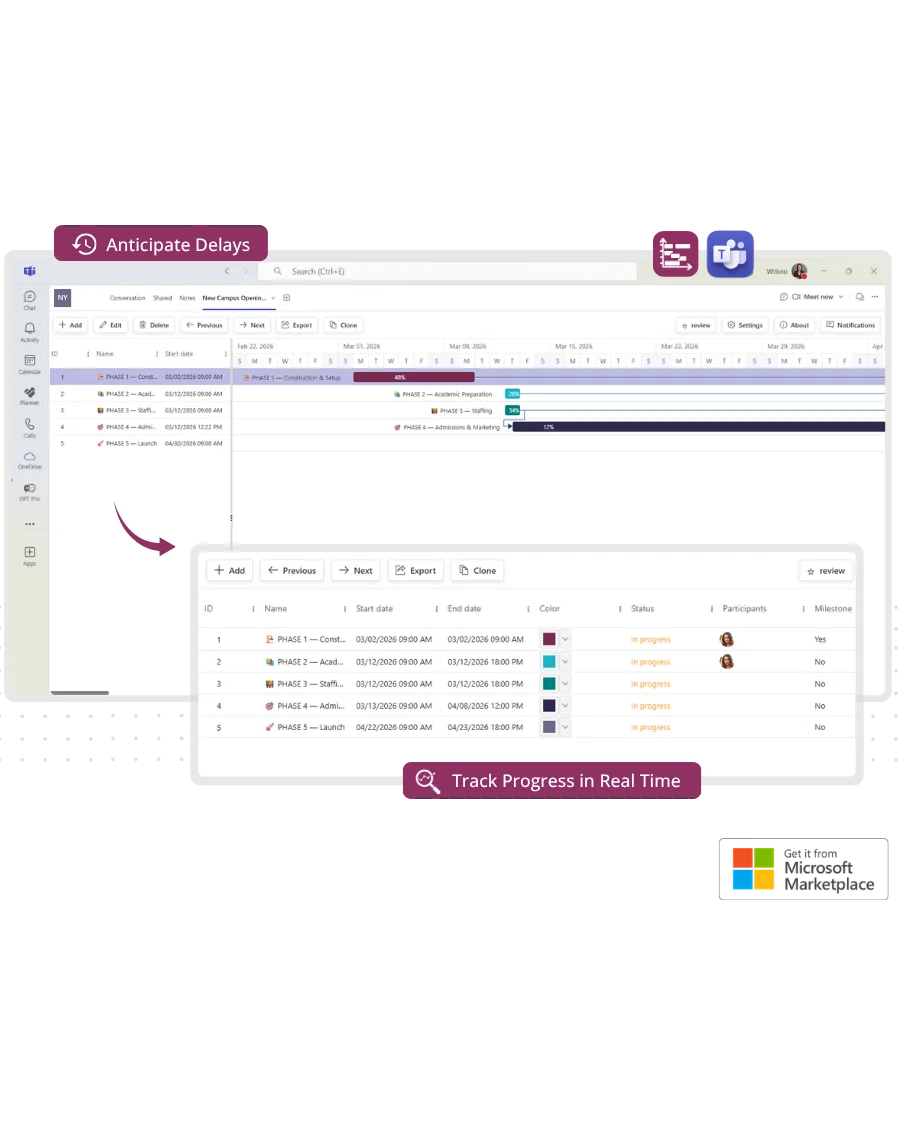
Gantt Chart Pro project timeline in Microsoft Teams

How Gantt Chart Pro helps you

Bring clarity and control to your projects

When project plans are scattered across tools or emails, teams lose time and visibility. Gantt Chart Pro gives everyone a shared view of the timeline, tasks, and progress, all inside Microsoft Teams.

Stay aligned on timelines

Everyone sees the same project schedule, so it's easier to plan, adjust, and deliver on time.

Spot blockers early

Visual task dependencies and progress indicators help you identify bottlenecks before they impact delivery.

Plan without switching tools

No extra logins or new tools. Manage and track projects directly within Teams, where the work happens.

Visual project planning
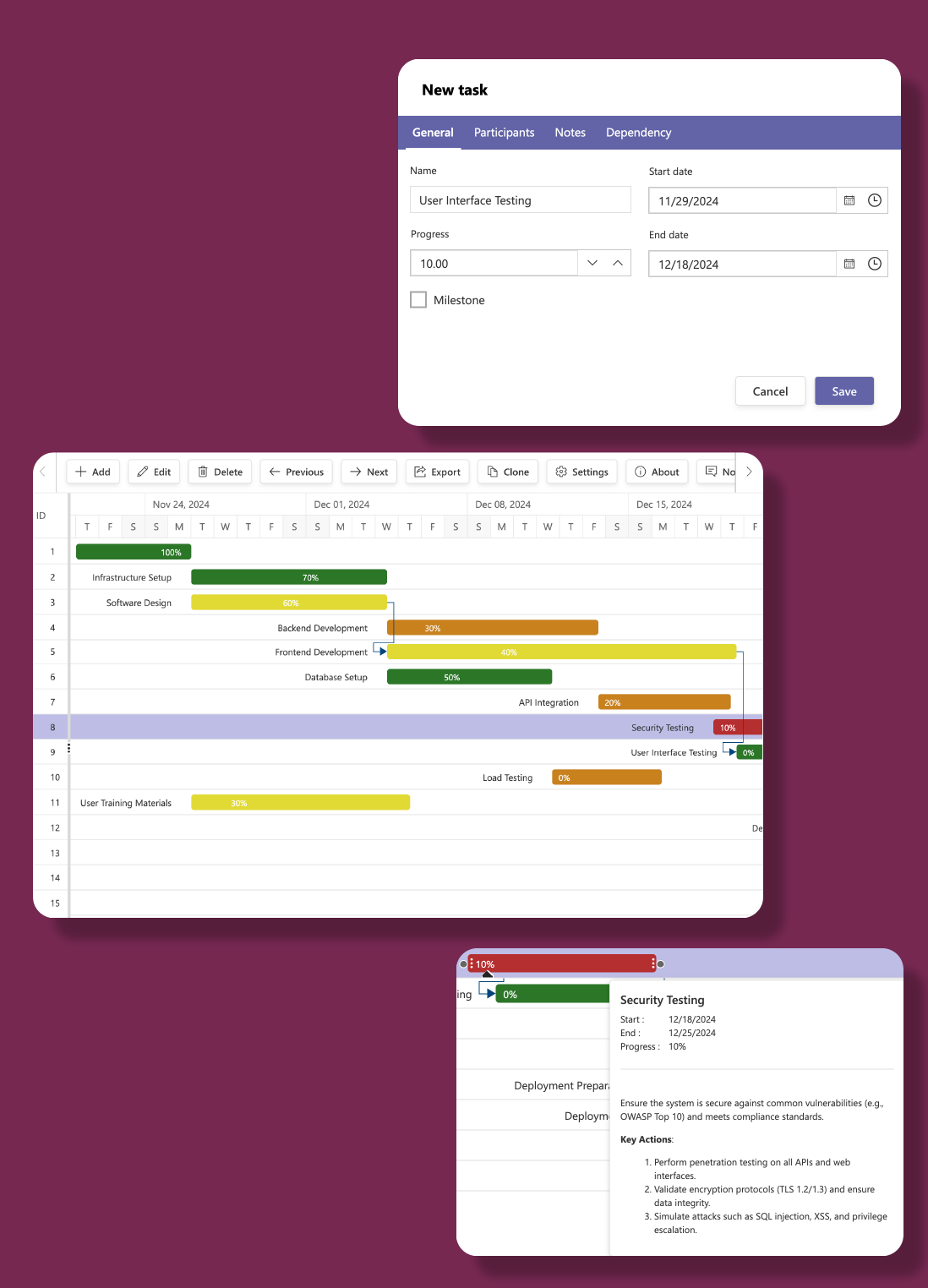
Plan and visualize every project detail

  • Build clear, interactive timelines using Gantt charts. Define tasks, subtasks, milestones, and dependencies all within Microsoft Teams.
  • Visualize timelines and adjust schedules effortlessly with interactive Gantt charts.
  • Break down projects into manageable tasks and subtasks for better clarity.
  • Highlight key dates and differentiate tasks with customizable color tags and milestones.
Gantt Chart Pro visual project planning

Team collaboration & tracking
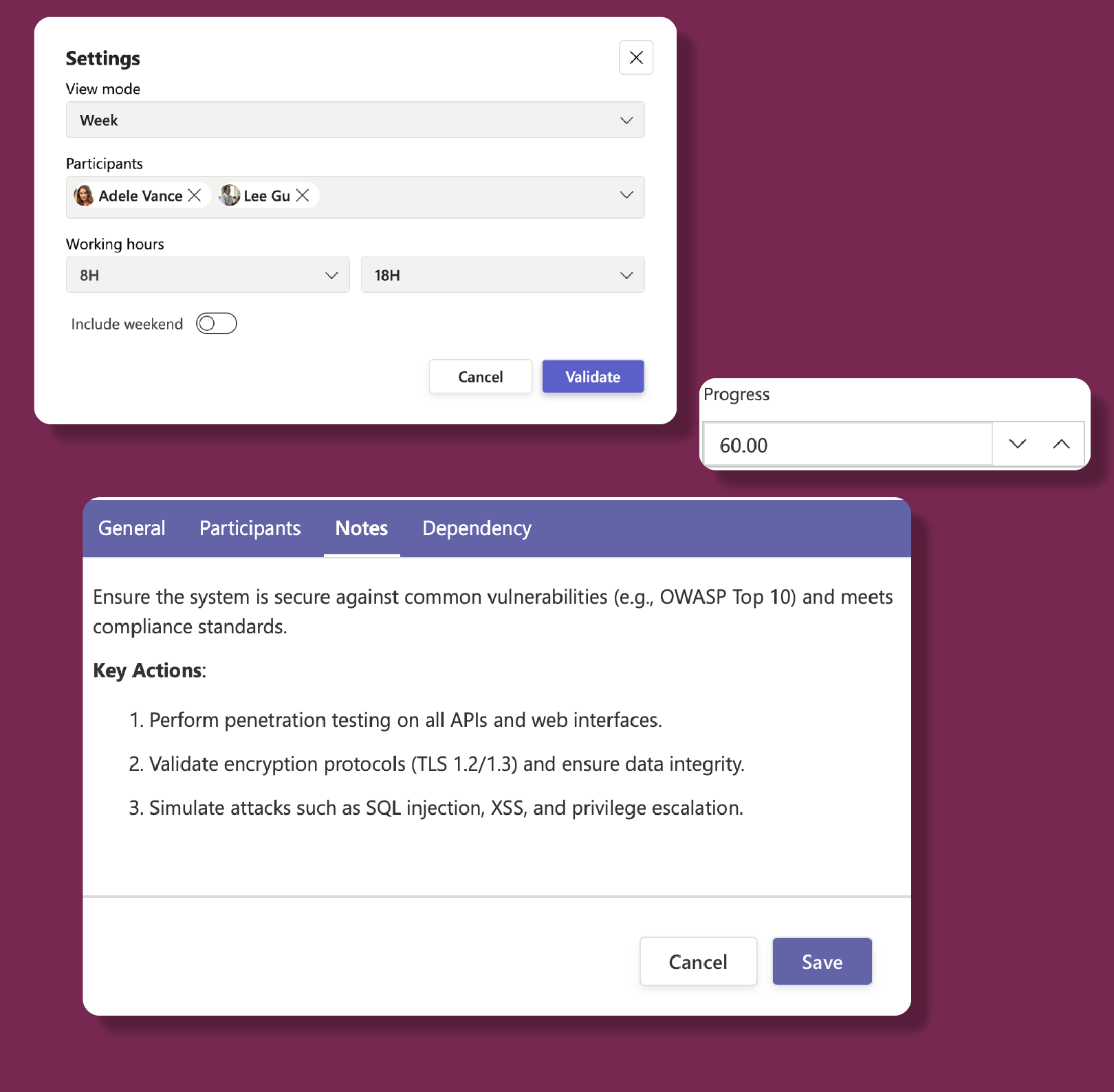
Keep your team in sync

  • Collaborate in real time with unlimited team participants.
  • Monitor progress with real-time updates and easy status tracking for every task.
  • Add instructions, updates, and insights directly to your tasks for clarity.
Gantt Chart Pro team collaboration

Export & reporting

Turn data into actionable insights

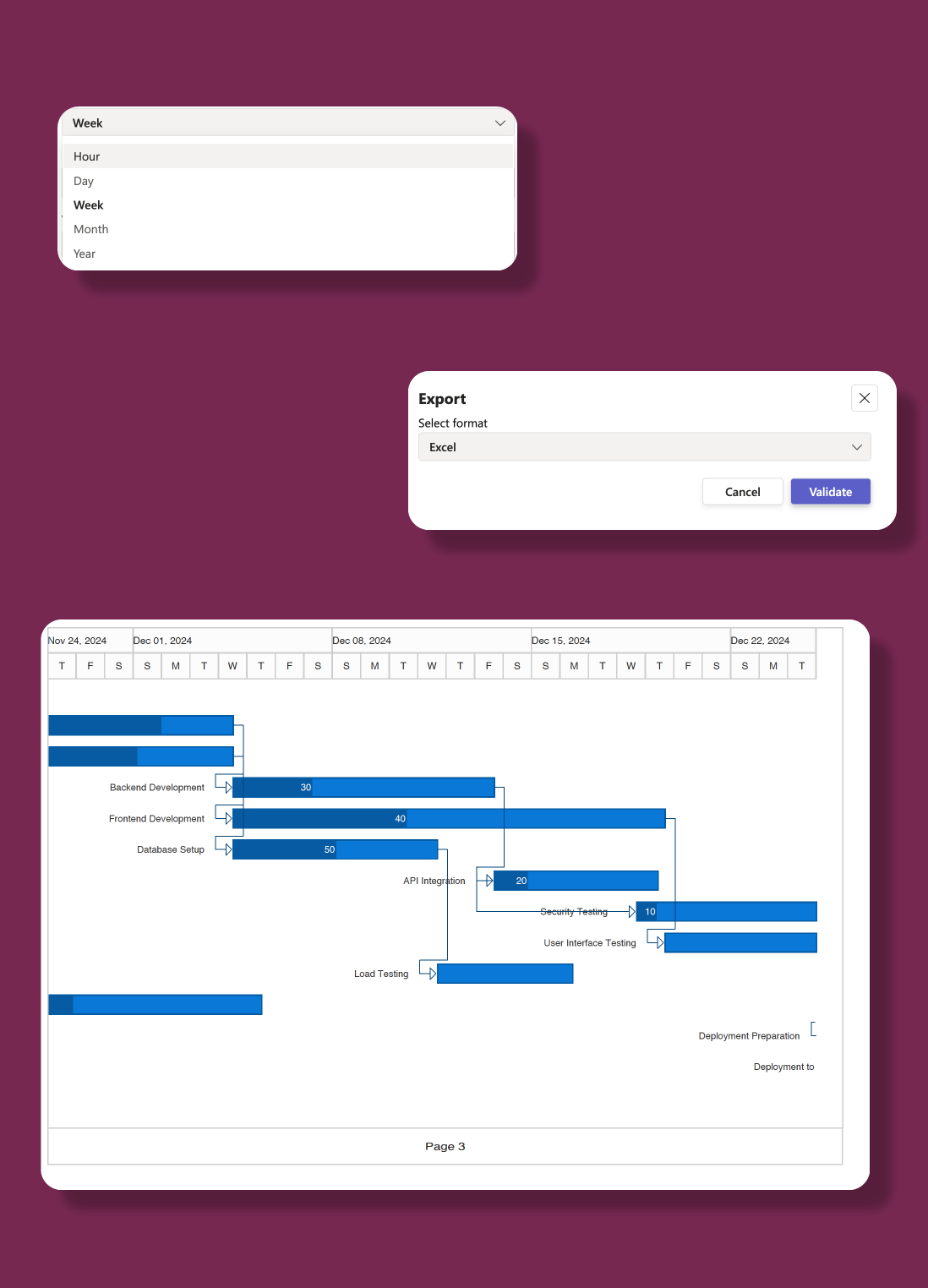
  • Download your project data in CSV format for seamless spreadsheet management.
  • Generate detailed reports by exporting tasks directly to an Excel file.
  • Create shareable, printable versions of your project timeline with PDF export.
Gantt Chart Pro export and reporting

Popular scenarios

How Gantt Chart Pro powers successful projects

From small businesses to global enterprises, Gantt Chart Pro helps teams plan, track, and execute projects efficiently, all within Microsoft Teams.

Small business projects

Streamline your project timelines with a clear, visual approach that simplifies task management.

Team collaboration

Enhance teamwork by keeping everyone updated and aligned on project progress.

Multi-location projects

Coordinate projects that span different offices, ensuring consistent timelines across locations.

Construction & renovation

Manage construction or facility projects by tracking every phase, ensuring deadlines are met.

Marketing & product launches

Plan detailed marketing campaigns and coordinate product launches with clear timelines.

Event planning & initiatives

Organize corporate events and strategic initiatives with a unified view of tasks.

Security & Privacy

Your project data stays where it belongs

Enterprise-grade security on Microsoft Azure. Your data stays in your Microsoft 365 environment.

Azure-Hosted

Enterprise-grade security on Microsoft Azure with ISO 27001 certification and 99.9% uptime.

GDPR & ISO 27001

EU-hosted infrastructure with full GDPR compliance. Your data stays in your region.

Microsoft Partner

Microsoft Solutions Partner with deep integration into Microsoft 365 and Azure AD.

Pricing & Plans

Estimate your plan. Checkout happens on Microsoft Marketplace

Use this simulator to calculate your team’s cost. When you’re ready, visit Microsoft Marketplace to complete your purchase.

Simulate your pricing

Seats

Switch Billing Frequency

Basic

Free

Premium

Popular

Loading... user/month

Not sure which plan to pick?

Choose Free if you’re managing smaller projects and just need essentials like task tracking, dependencies, and simple updates. Go with Premium if your projects are bigger and need more : unlimited tasks, color coding, milestones, exports, and collaboration with your full team.

Witivio is a trusted Microsoft Partner

Available on Microsoft AppSource
Microsoft Partner of the Year
Microsoft IP Co-sell
Microsoft AI Cloud Partner
Microsoft MACC Eligible
Microsoft Azure Marketplace
Compare plans
Premium
Loading... user/month
Go to Admin Center

Core Features

Unlimited tasks

Unlimited subtasks

Unlimited participants

Task color

Milestones

Task dependencies

Task progress

Notes to tasks

Filter and sort tasks

Export

Export tasks to .pdf

Export tasks to .csv

Export tasks to .xlsx

Data Management

EU Data Residency

GDPR Compliance

Data Storage and Backup

(Data is stored but recovery is not guaranteed)
(Data is stored but recovery is paid)

Data Retention Policy

(Data retained for 1 year)
(Data retained for 5 year)

Business Support

Help Center Access​

Support Tickets and Live Chat

Priority handling

FAQ

Frequently asked questions

What is Gantt Chart Pro?
Gantt Chart Pro is a project management app for Microsoft Teams that lets you create interactive Gantt charts to plan timelines, assign tasks, and track progress directly in your channels.
Can I assign tasks to team members?
Yes. You can assign tasks to any team member, set due dates, add dependencies, and track completion percentage , all within Microsoft Teams.
Does Gantt Chart Pro support task dependencies?
Yes. You can set finish-to-start dependencies between tasks. When a predecessor task is delayed, dependent tasks are automatically adjusted.
Can I export my Gantt chart?
Yes. Gantt Chart Pro supports export to PDF and image formats for sharing with stakeholders outside Microsoft Teams.
How much does Gantt Chart Pro cost?
The free version allows up to 5 tasks and 3 participants. Premium plans start at $1.29 per user per month with unlimited tasks and participants.

Ready to bring clarity to your projects?

Join 10,000+ organizations using Gantt Chart Pro to plan and track projects inside Microsoft Teams.